Leading world scientists convene in Brazil July 21-25 amid growing concern that evaporation and ongoing destruction of world wetlands, which hold a volume of carbon similar to that in the atmosphere today, could cause them to exhale billows of greenhouse gases.
Meeting in the city of Cuiaba on the edge of South America's vast Pantanal, the largest wetland of its kind, some 700 experts from 28 nations at the 8th INTECOL International Wetlands Conference will prescribe measures urgently needed to better understand and manage these vibrant ecosystems, ranked among the planet's most threatened, and slow their decline and loss.

Warming world temperatures are speeding both rates of decomposition of trapped organic material and evaporation, while threatening critical sources of wetlands recharge by melting glaciers and reducing precipitation.


Covering just 6% of Earth's land surface, wetlands (including marshes, peat bogs, swamps, river deltas, mangroves, tundra, lagoons and river floodplains) store 10-20% of its terrestrial carbon. Wetlands slow the decay of organic material trapped and locked away over the ages in low oxygen conditions.

These waterlogged (either seasonally or year-round) areas contain an estimated 771 gigatonnes (771 billion tonnes) of greenhouse gases -- both CO2 and more potent methane -- an amount in CO2 equivalent comparable to the carbon content of today's atmosphere.

"Humanity in many parts of the world needs a wake-up call to fully appreciate the vital environmental, social and economic services wetlands provide -- absorbing and holding carbon, moderating water levels, supporting biodiversity and countless others," says conference co-chair Paulo Teixeira, Co-ordinator of the Cuiaba-based Pantanal Regional Environmental Programme, a joint effort of the United Nations University and Brazil's Federal University of Mato Grasso (UFMT), which will host the event.

Says UN Under Secretary-General Konrad Osterwalder, Rector of UNU: "Too often in the past, people have unwittingly considered wetlands to be problems in need of a solution. Yet wetlands are essential to the planet's health -- and with hindsight, the problems in reality have turned out to be the draining of wetlands and other 'solutions' we humans devised."

If the decline of wetlands continues through human and climate change-related causes, scientists fear the release of carbon from these traditional sinks could compound the global warming problem significantly, says Prof. Paulo Speller, Rector of UFMT. Drained tropical swamp forests release an estimated 40 tonnes of carbon per hectare per year. Drained peat bogs release some 2.5 to 10 tonnes of carbon per hectare per year.

Adds Prof. Speller: "This landmark conference beside the Pantanal will gather an overview of the status of global wetlands, identify knowledge gaps, create greater collaboration and consistency in wetland science worldwide, and offer a plain-spoken policy prescription for decision makers with an appeal to adopt it with urgency."

German expert Wolfgang Junk says the impact of climate change on wetlands is small so far compared to the damage caused by poor management at the local level.

"Lessening the stress on wetlands caused by pollution and other human assaults will improve their resiliency and represents an important climate change adaptation strategy," he says. "Wetland rehabilitation, meanwhile, represents a viable alternative to artificial flood control and dredging efforts that may be needed to cope with the larger, more frequent floods predicted in a hotter world."

Prof. Junk, of the Max-Planck-Institute for Evolutionary Biology, notes that maintenance of wetlands is much cheaper than rehabilitation and that poorer countries will have fewer means to rehabilitate their wetlands to cope with climate change. Wetland-friendly development alternatives must be elaborated in developing countries, therefore, to minimize losses of their many benefits, he says.

He notes too that while pressure on wetlands in poorer countries has risen dramatically in recent years, they have not suffered nearly as much damage as those in the developed world.

Some 60% of wetlands worldwide -- and up to 90% in Europe -- have been destroyed in the past 100 years, principally due to drainage for agriculture but also through pollution, dams, canals, groundwater pumping, urban development and peat extraction.

Notwithstanding recent efforts in such countries as Australia and the U.S. (which has lost 50 million of an estimated 90 million hectares of wetlands 500 years ago) to protect wetlands and reverse past damage, at a world scale they continue to shrink.

"Wetlands act as sponges and their role as sources, reservoirs and regulators of water is largely underappreciated by many farmers and others who rely on steady water supplies," says Prof. Junk. "They also cleanse water of organic pollutants, prevent downstream flood inundations, protect riverbanks and seashores from erosion, recycle nutrients and capture sediment."

Typically high in nutrients, wetlands also offer rich habitats for small organisms which feed fish and other water life, which in turn nourish mammals and birds. Many wetlands feature biodiversity comparable to that of rainforests or coral reefs.

Conference organizers say efficient protection of wetlands requires complex, long term management plans that cover their entire catchment areas, often involving agreements between states or countries. These agreements need to cover activities that affect wetlands both directly and indirectly, such as the use of water and soils, development, waste treatment and disposal, but also harmonization of environmental legislation for protection of wetlands and all that lives in them.

Background information

  • Wetlands along the flood-prone Mississippi once stored 60 days of the river's floodwater; today they can store only 12 days' worth.
  • Around Africa's Lake Victoria, wetlands are so degraded they can no longer filter nitrate and phosphate runoff from surrounding land. The result: eutrophication and an explosive growth of lake-clogging water hyacinth.
  • In Malaysia, 90 percent of freshwater swamps have been drained for rice cultivation.
  • A study of a large wetland in arid northern Nigeria found it yielded an economic benefit in fish, firewood, cattle grazing lands and natural crop irrigation 30 times greater than the yield of water being diverted from the wetland into a costly irrigation project.
  • At US$15 000 per hectare per year, the economic value of flood prevention and other ecological services provided by wetlands is greater than any other ecosystem -- seven times that of the next most valuable, tropical rainforests, according to a recent study.
  • The peat bogs of Siberia, North America and Scandinavia contain a third of all carbon in the world's soils. Those in Scotland contain more than 90 percent of the carbon in British soils and forests.
  • The US will spend $700 million over two decades to revive the Florida Everglades. It will include six artificial wetlands ("storm water treatment areas"), to receive and cleanse excess nutrients from neighbouring farm districts.
  • The world's most threatened wetlands include those around the Mediterranean, where for two millennia the population has been draining wetlands and floodplains for agriculture -- and more recently for urban areas, tourist developments, and to eradicate malarial mosquitoes.
  • Both Spain and Greece drained 60 percent of their wetlands in the last century. Pumping of groundwater for agricultural irrigation is drying Spanish wetlands such as the Doñana reserve, one of Europe's top sanctuaries for wintering birds, where the water table is falling one meter every two years.
  • Wetlands constitute an estimated 20% of South America but they are poorly mapped or classified by characteristics.
  • The vast, remote and relatively pristine Pantanal, spanning 160,000 square km, is confronted by increasing development pressure. Its catchment area straddles Brazil, Bolivia and Paraguay, while Uruguay and Argentina are downstream.

Adapted from materials provided by United Nations University, via EurekAlert!, a service of AAAS.
Read More......
Wednesday, June 4, 2008

Kindle Receives 5,000 More Book Titles

Amazon's Kindle reader gets an infusion of book titles.

After announcing in April it replenished its supply of the Kindle eBook reader, Amazon announced the Simon & Schuster Inc. book publisher will release more than 5,000 additional titles for the popular eBook reader made by Amazon.

"This commitment from Simon & Schuster moves us closer to our vision for Kindle, which is to make any book, ever printed, in any language available in less than 60 seconds," said Amazon.com Founder & CEO Jeff Bezos.

The 5,000 additional titles will mean Kindle owners will have more than 125,000 total titles for download.

Using the device's built-in wireless ability, owners also have the ability to subscribe to select newspapers, blogs or magazines for monthly subscriptions. The EVDO connection also allows U.S. Kindle owners to purchase and download new book titles in about one minute.

Last month, Amazon announced it received a new supply of Kindles after quickly selling out during the 2007 holiday shopping season. The company has not released sales numbers of Kindle units shipped, or the number of eBooks sold through the site.

Amazon also dropped the retail price of the device from $399 down to $359.

The overall popularity of reading books in formats other than printed books remains sketchy, with a Random House/Zogby poll reporting 82 percent of readers polled claiming they prefer printed books over eBooks.

Bezos announced the retailer ran out of physical copies of "What Happened: Inside the Bush White House and Washington's Culture of Deception," a book written by Scott McClellan, former White House press secretary. The site does have electronic copies of the book available for its customers, however.

"That's one of the great things about electronic books," Bezos said during the BookExpo America convention. "They don't go out of stock."

Read More......
Monday, May 19, 2008

Get Vista's Best Features in XP


Despite the fact that most of you prefer XP to Vista and would rather Microsoft extended XP's shelf-life, several new and improved features available in Vista would be great to have in XP. This new functionality may not be enough to get you to switch to Vista, but that doesn't mean you're out of luck. Let's take a look at a few ways you can incorporate Windows Vista's best features into your current XP PC for free.
We're going to focus on Vista's small and large features that are missing from XP, separated into three categories: applications, functional, and aesthetic (e.g., transparency is aesthetic, the new start menu search is functional). This list is not exhaustive, but it does cover the features readers feel make Vista worth it.

Bring Vista's Best New and Improved Apps to XP
First, aside from some of the small operating system improvements we'll go into below, Vista also bundles up a few new and improved applications worth mentioning.

A Better Explorer: Windows Explorer is one of the most improved applications in Vista, thanks to added features like breadcrumb navigation, better file previews, and more. There are a few add-ons that add some of these better functional adjustments to Explorer, but in general XP users might want to consider replacing XP's Explorer altogether with something like Xplorer2 (original post) or significantly beefing it up with a tool like QT TabBar (original post). You can also get that saucy breadcrumb navigation alone with Explorer Breadcrumbs (original post).

Encrypt Your Hard Drive: Some versions of Vista—toward the Ultimate end of the scale—come with a new drive encryption software called BitLocker built in. If you're keen on security and encryption but you want to stick with XP, check out the free, open source TrueCrypt (original post). If you need a little help getting started, check out our guide to encrypting data with TrueCrypt.


Take Quick and Easy Screenshots: PrtScrn has been around forever, but it's never been the most user-friendly way to get a screenshot. In Vista, Microsoft threw in a screenshot utility called the Snipping Tool. Fact is, if better screenshots are important to you, there are gobs of excellent free screenshot apps available for XP like Screenshot Captor (original post), Clip2Net (original post), and Jing (original post), among many others.

Bring Vista's Best Functional Features to XP
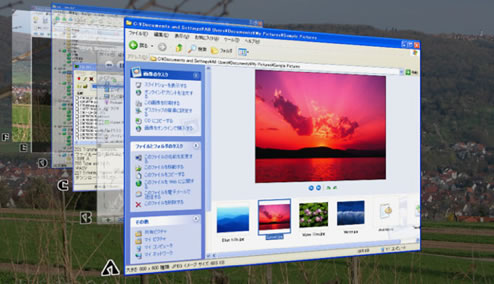
Task-Switching à la Flip 3D: Vista's Flip 3D is like Alt-Tab on steroids, displaying full previews of each window as you move through it. To a large extent it's eye candy, but it can also be really useful in finding the right window when you're switching from your keyboard. Freeware applications like Shock Aero 3D (original post) and WinFlip bring the same 3D shuffling (and then some, in the case of WinFlip) to to your XP desktop.

Integrated Start Menu Search and Launch: Dubbed Instant Search by Microsoft, this new feature adds a search box to the Windows Start menu for quick searching and launching of documents and applications. If you want to port this same functionality to XP, you can do so with apps like ViStart (original post) or Vista Start Menu (original post)—an extraordinarily beefed up version of the Windows Start menu. Then again, if you're not stuck on the notion of a search-and-launch box built directly into the Start menu, you can't go wrong with Launchy or Google Desktop Search.

Replace the Windows Sidebar: Third-party tools similar to Windows Sidebar and Gadgets pre-dated Vista, so you can trade in desktop real estate for the same functionality with SideSlide (original post) or the Google Desktop Sidebar.

Live Thumbnail Previews of Files: Vista does a nice job of providing thumbnail previews to most image files and even text files, and while XP does have similar functionality, it's not as advanced as Vista's. Freeware application Xentient Thumbnails (original post) creates live thumbnails for virtually all images, and if you want a more intimate look at the innards of text and other files without opening them, check out InfoTag Magic (original post).

Speed Up Your System with a Thumb Drive: Windows ReadyBoost speeds up your performance by using a USB thumb drive as system memory, and while nothing beats an actual RAM upgrade, XP users can check out eBoostr (original post) to bring the same functionality to XP.

Streamline Your File Renaming: Microsoft got smart in Vista and changed the behavior when you hit F2 to rename a file, selecting only the name of the file and leaving the extension alone. For a very simple integration of this feature into XP, check out the Better Rename utility. Alternately, if you feel like adding this feature and beefing up Windows Explorer on top of that, you can get the same renaming behavior in Xplorer2 (original post) or QT TabBar (original post).

Taskbar Window Previews: If you like how Vista offers handy little thumbnail previews of windows when you hover over their taskbar item, freeware application Visual Tooltip (original post) brings the same goods to XP.


Give XP that Vista Look

Ultimately, despite all the little feature improvements Vista can throw your way, a new operating system's biggest selling point is often the eye candy—in Vista's case, Aero. There are a lot of tools available that can help you theme XP to look more like Vista, though often users of such applications see mixed results, so proceed at your own risk.
Probably the most comprehensive XP-to-Vista tweaker is the Vista Transformation Pack, which transforms everything from the Start menu and Control Panel to icons.
For a less full-on approach, you could try out skinning utility Uxtheme Patcher with one of several themes from art web site deviantART (like this one or this one) to make XP look and feel more like Vista.
Isn't There More to It Than That?
There are surely some under-the-hood changes in Vista that you won't get from these simple upgrades, but let's be honest: You care about the features, not the underlying code. And since you can get most of Vista's new features from the comfort of XP—and you can stick to XP as a quick, resource-light alternative to Vista—it looks like most of you won't be changing horses anytime soon.
If there's a Vista feature or an XP app you love that wasn't included in this list, let's hear about it in the comments. While you're getting the goods of Vista in XP, you may also want to take a look at how you can get the best of Firefox in Internet Explorer.

Adam Pash is a senior editor for Lifehacker who really only likes XP for its snazzy Media Center improvements. His special feature Hack Attack appears every Tuesday on Lifehacker. Subscribe to the Hack Attack RSS feed to get new installments in your newsreader.

Read More......


Microsoft Research releases astronomy application WorldWide Telescope, software which offers "terabytes" of detailed telescope images of the night sky for exploration right on your desktop. Zoom, pan, and explore the solar system, galaxies and more using WorldWide Telescope. The BBC reports:
Collections include pictures from the Hubble and Spitzer telescopes, as well as the Chandra X-Ray Observatory. ... "Users can see the X-ray view of the sky, zoom into bright radiation clouds, and then cross-fade into the visible light view and discover the cloud remnants of a supernova explosion from a thousand years ago," explained Roy Gould, a researcher at the Harvard-Smithsonian Center for Astrophysics.


Check out WorldWide Telescope in action after the jump.

Via Gizmodo, here's a demo of WorldWide Telescope at the TED conference back in February.

Read More......

A wide variety of boot problems have been reported with Windows XP SP3, fortunately many of them are very fixable.

Windows XP remains a standard throughout much of the IT community, and remains popular among consumers as well. Thus many consumers are pleased that Windows XP Service Pack 3 is back in action, after being pulled a week for a software fix. The new service pack provides additional useful features, numerous bugfixes, and minor performance improvements.

Unfortunately some users are also finding that it provides their computer with an endless reboot loop. First, to dispel a common misconception, the reboot itself has nothing to do with a problem with XP SP3. Rather, the problem is during the boot, which results in a crash. In the case of the crash, Windows XP behaves correctly -- it reboots the computer and asks the user if they want to boot into safe mode, defaulting to a normal boot if no option is selected.

Users are not happy about the developments. Michael Faklis posting on the Windows XP discussion board, vents, "My external disks are having trouble starting up, which results in Windows not starting up. After three attempts [to install XP SP3] with different configurations each time, System Restore was the only way to get me out of deep s**t."

The source of many of the problems has been traced to manufacturers, which takes a bit of heat off Microsoft. Perhaps the single biggest problem appears to be caused by Hewlett Packard's configuration choices. By default HP deploys the driver intelppm.sys on all their computers, including those with AMD processors. The driver provides power-management, but only for Intel machines. On AMD machines a second driver, amdk8.sys is also added, which performs the same functionality for AMD processors.

If your machine's HP part number ends in a 'z', you probably have an AMD processor. Or you could just peek inside. Either way, if you have an AMD machine, you will likely experience crashes when you install Windows XP SP3. This is really not Microsoft's fault as HP is installing an unsupported configuration by adding both drivers. To fix the problem, if you haven't added SP3 yet, just type "disable intelppm" in the command prompt or run "sc config intelppm start= disabled" if you already installed it and can only boot to safe mode.

Another problem seems to occurring on certain motherboards, which affects USB devices. Users found a simple fix to this problem -- some report that by plugging in a USB storage device their computer will boot normally, but without the device attached it will crash. For non-AMD/HP users, this remains an option if dealing with crashes. Also some have found that switching the mouse from USB to PS/2 port (via the adapter to the round PS/2 port) fixes the problem, indicating it may be an issue with USB mouse drivers.

Additionally, users of AMD's Catalyst 8.4 drivers have also reported some crashes. To see if the video driver is the issue, boot to VGA mode. If it works, the video driver may be to blame. One isolate report of an NVIDIA related crash also occurred, but it was unreported what driver was used. Other miscellaneous crashes appear to be due to systems with multiple hard disks.

A very helpful resource to deal with the problems is provided by Microsoft MVP in Windows Security, Jesper Johansson, who offers additional helpful details to these and other potential problems and their fixes on his blog.

As Johansson points out, the most extreme solution when none other can be found is simply to uninstall XP SP3. To do this, refer to the Microsoft Knowledge Base article on the topic.

While Windows XP is receiving some bad press due to the crashes, again, it appears that most of the crashes are due to hardware issues stemming from unsupported configurations, and thus the blame fall largely to the PC manufacturers, and the makers of component drivers. Fortunately, the majority of the problems have easy fixes that do not even requiring uninstalling the Service Pack.

Similar problems occurred with Windows Vista SP1, though in that case the blame ended up resting with a Microsoft pre-install update. It is fairly typical for a Service Pack to take some computers out of commission, particularly one for an OS with as large an operating base and as varied a hardware environment as Windows XP. Nonetheless, such problems are serious concerns for users affected, and those potentially at risk.

Read More......